Log Number System for Low Precision Training
Introduction
Ok first things first, what is LNS?
LNS stands for "Logarithmic Number System". So how does it store numbers and what makes it different than storing numbers in FP32?
Think of FP32 as a standard ruler where the markings and the distance between them is same throughout.
The distance between 1 and 2 will be same as the distance between 10 and 11.
But on the other side, LNS is like a slide ruler where for smaller numbers the markings are extremely close and they get much further apart for large numbers.
In this way the precision is high for numbers that are closer to 0 and it keeps on decreasing for numbers as they get bigger.
Example
Let us store 9.5 in FP32.
The number is broken down into 3 parts:
- Sign: Positive or negative
- Mantissa: These are the significant digits of the number. The binary of 9.5 is
1001.1.
In scientific notation this is written as1.0011 * 2^3.
The mantissa stores the0011part. - Exponent: This tells you how far you are supposed to float the binary point — here the exponent is 3.
Now let us store it in LNS
It is way more direct.
It also stores the sign but stores the log of the number's absolute value.
- Sign: Is it positive or negative.
- Logarithm: Calculates the base-2 log of the number.
So the LNS system stores the sign and the single value 3.248 and the number is represented as:
Why is this representation useful?
Now where does the difference lie?
Like what did we accomplish by representing numbers differently? Is there any benefit?
Yes! Speaking in terms of computational efficiency, there is a lot of difference.
Multiplication in FP32
Let’s say we want to multiply 8 by 16.
Represent 8: 1.0 × 2^3
Represent 16: 1.0 × 2^4
To multiply:
Multiply the mantissas: 1.0 × 1.0 = 1.0
Add the exponents: 3 + 4 = 7
Result: 1.0 × 2^7 = 128
This requires a dedicated, complex multiplication circuit.
Multiplication in LNS
Represent 8: log₂(8) = 3
Represent 16: log₂(16) = 4
To multiply: You just add the logarithmic values.
3 + 4 = 7
To get the result, you calculate 2^7 = 128.
The core operation is just an addition, which is much faster and more energy-efficient in hardware than multiplication.
The Bigger Picture
Ok done with the basics, let us dig deep into this paper.
So if LNS is that good, why aren't we using it right?
Why isn't it the go-to choice for all AI hardware stuff?
Well, the answer is in the training of neural networks — specifically in the part of updating weights!
As mentioned earlier there is difference in the markings on the LNS scale right?
This ever-widening space between the numbers is called the quantization gap.
Imagine training an algorithm like SGD
Stochastic Gradient Descent (SGD): randomly pick one data point → calculate error slope → step opposite direction → repeat many times.
Update weights little by little. Faster than full data. Can jump out of traps (local minima). Gets model closer to best solution.
So in a nutshell, we make tiny changes to the weights of the model based on the errors we find.
For a small weight, the markings on our LNS scale are very close and precise so we will be able to register those easily without any problem.
But for larger weights the markings are miles apart and the system will be forced to choose the nearest available value — sometimes leading to no change at all!
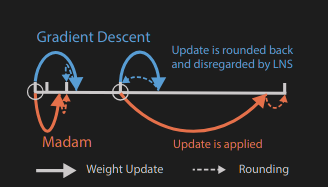
This is the main crucial insight of the paper which states that
“updates generated by stochastic gradient descent (SGD) are disregarded more frequently by LNS when the weights become larger”.
The Solution
Earlier methods used a weird hack — keeping a second high precision FP32 copy of the weight just for the updates — but this is inefficient, as it doubles the memory cost.
So the paper introduces a new framework to solve the above issue.
In this, both the number system and the learning algorithm are built to work around this problem.
A Better "Multi Base" LNS
Instead of having a fixed pattern of markings, the LNS-Madam team used "Multi-Base" LNS.
A low base gives you high precision for smaller numbers and vice versa.
Instead of choosing just one base, LNS-Madam allows us to choose the best base for the job.
This flexibility allows us to fine-tune the precision of the system according to our needs, ensuring that the quantization gaps are as small as possible where it matters the most.
A Smart Optimizer — The "Madam" Optimizer
They basically went and replaced SGD with a more powerful tool: the Madam optimizer.
So what is the difference?
It is a multiplicative optimizer.
Instead of updating the weights by increasing or decreasing them by 0.1, it makes them change by 1%.
This change is absolutely genius because it solves our main problem entirely.
For a small weight change (e.g., 0.5) of 1%, the reduction is tiny (-0.005) and the LNS tool is precise to handle it.
But for a large weight (e.g., 128), the 1% reduction is still significant (-1.28), enough to cross the quantization gap.
It doesn’t get rounded away and gets applied successfully.
Deep into the Maths of It
Multi-base Log Representation
Ok let us try to break the maths.
Let us say we want to represent some number and let us call it ‘Actual Number’.
So according to the paper:
Where Stored Integer is the only number our computer stores in its memory — it’s just a simple integer.
γ (gamma) is the special turning knob that allows us to control the precision and range of our system.
Example
Let γ = 4
The number we want to represent = 16
- We need to find the stored integer for 16.
- Formula is
16 = 2^(stored_integer / 4) - We know that 16 = 2⁴
- So when bases are same, we can equate our exponents as
4 = stored_integer / 4 - Solving for stored_integer we get stored_integer = 16
So in our system, whenever we want to use the number 16, our computer just stores the number 16.
Let the actual number be 5 with γ = 4.
We know that 5 = 2^2.3219,
which means 2.3219 = stored_integer / 4 and hence stored_integer on solving comes out as 9.
🧮 Example 1 — Smaller γ (γ = 2)
Let’s pick γ = 2 and say our Stored_Integer = 6
If we increase Stored_Integer to 7:
Notice how just increasing by 1 in stored integer made a big jump (from 8 → 11.3).
That means low γ → coarse precision but wide jumps in value.
Example 2 — Larger γ (γ = 8)
Now set γ = 8 and keep Stored_Integer = 6 again.
Increase Stored_Integer by 1 → (7/8):
This time, increasing by 1 in stored integer made a tiny change (1.68 → 1.83).
So higher γ → finer precision (markings closer together).
Arithmetic Operation in LNS — The Real Deal
Let us say we want to multiply two numbers: 16 and 8.
Find the stored_integer representation of both numbers by keeping γ = 4
- For 16 → stored_integer = 16
- For 8 → stored_integer = 12
Perform the multiplication by just adding the integers:
16 + 12 = 28Convert back to the actual number:
And just like that, we correctly calculated that 16 × 8 = 128 by only performing a simple addition!
Problem of Adding Numbers
The system works fine for multiplication, but what if we need to add numbers?
Take an example of numbers in dot product like this:
a*b + c*d + ...
The (a*b) part is easy. In LNS, we just add the stored integers:
Stored_Integer_a + Stored_Integer_b → call this Log_Result_1.
The (c*d) part is also easy:
Stored_Integer_c + Stored_Integer_d → call this Log_Result_2.
Now we have a problem.
The next step is to add these two results together: (a*b) + (c*d)
However, we are in the logarithmic world.
We have Log_Result_1 and Log_Result_2.
There is no simple logarithmic rule for addition.
The Solution
Convert them back to the original numbers.
Let’s use an example to illustrate this.
Let γ = 4, and after some LNS multiplication, we end up with a new stored_integer = 23.
We need to convert this back to its actual number.
Step 1: Split the stored integer
23 ÷ 4 → quotient = 5, remainder = 3
Step 2: Rewrite the math using the split
Step 3: Attack the two simple pieces separately
- For the
(2^5)part: This is the quotient part. Raising 2 to an integer power is a bit-shift operation, extremely fast — the digital equivalent of adding zeros. - For the
(2^(3/4))part: This is the remainder part.
Since γ is 4, possible remainders are 0, 1, 2, or 3.
The answers are pre-calculated and stored in a small Look-Up Table (LUT).
So the computer is left with one final multiplication — and that’s it!
In the paper, the equation looks like this:
Making the Conversion Even Cheaper!
When γ = 4, our LUT had 4 entries.
But what if we have a bigger γ, like γ = 256?
Now we need 256 entries, which takes up more memory.
The paper introduces a simple math shortcut called Mitchell’s Approximation to shrink the LUT without losing much accuracy.
Mitchell’s Approximation
Take a small number, x = 0.1
Compute: 2^x = 2^0.1 = 1.0717...
The approximation states that if a number (x) is very small then:
Now let’s apply this:
1 + 0.1 = 1.1 which is approximately equal to 1.0717.
But this works only if x is small.
Hybrid Approach
Since approximation couldn’t be used for everything, the authors went for a hybrid approach combining a small, accurate LUT with the cheap approximation.
Let’s say we need to calculate the remainder part of 2^(13/16).
Step 1: Split the remainder
Binary of 13 → 1101
Split into:
- MSB Component (Most Significant Bits): 1100 (decimal 12)
- LSB Component (Least Significant Bits): 0001 (decimal 1)
So the problem becomes:
2^((12+1)/16) = 2^(12/16) * 2^(1/16)
Now for the 2^(12/16) (MSB) part — it has a big effect and must be accurate → use LUT.
Since MSB can only take a few values (0, 4, 8, 12), we only need a 4-entry LUT instead of 16.
For the 2^(1/16) (LSB) part, since 1/16 is small, we use Mitchell’s Approximation.
At the end, simply combine the results — and you’re good to go!